Quote from
Lance on December 5, 2023, 5:09 PM
In order to use Mitel 6900 series phones on RingCentral service, you must factory default the phones before they can be used on RingCentral service. You can reset these phones in five simple steps.
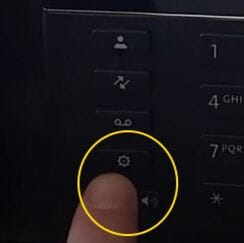
Step 1) Hit the Settings button.

Step 2) Select the Advanced soft key.

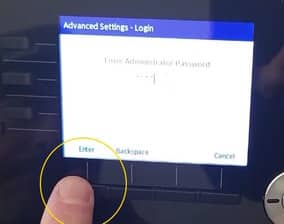
Step 3) Enter the default password of 1234 followed by the Enter key.

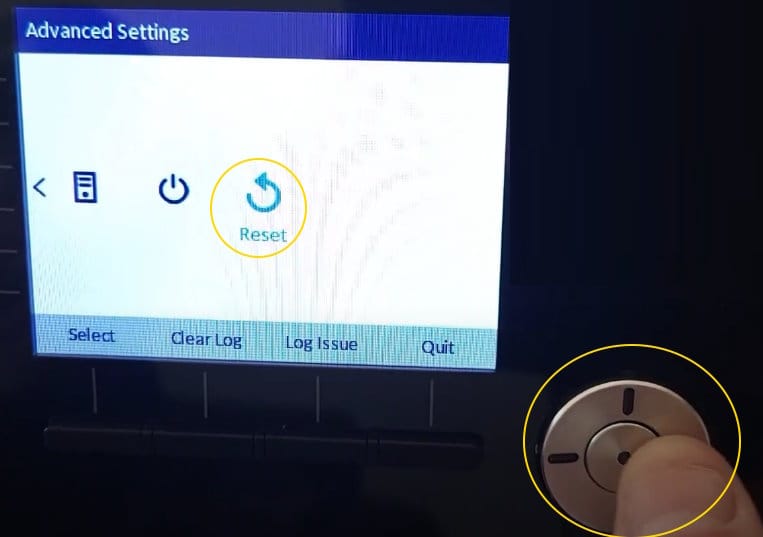
Step 4) Scroll to the far right using the direction pad until you reach the Reset option. Then select the Reset.

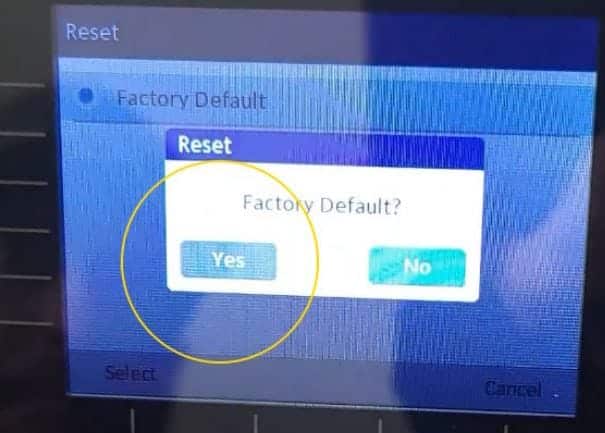
Step 5) After you select reset, say Yes to prompt to Factory Default the phone.

https://youtu.be/KEUGaYlwTh4?si=TJD_l1emWS4QVSOp
Now, your Mitel 6900 series phone is ready to be utilized with RingCentral service.
In order to use Mitel 6900 series phones on RingCentral service, you must factory default the phones before they can be used on RingCentral service. You can reset these phones in five simple steps.
Step 1) Hit the Settings button.
Step 2) Select the Advanced soft key.
Step 3) Enter the default password of 1234 followed by the Enter key.
Step 4) Scroll to the far right using the direction pad until you reach the Reset option. Then select the Reset.
Step 5) After you select reset, say Yes to prompt to Factory Default the phone.
Now, your Mitel 6900 series phone is ready to be utilized with RingCentral service.